


















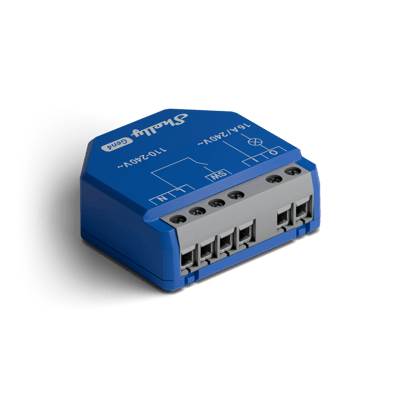
Relays Shelly wiring diagrams
Shelly 1 Gen4 and Gen3 wiring diagram
How to wire a Shelly 1 to switch a light, an exhaust fan or an irrigation valve, or to pulse a garage door opener through its dry contact.
Wiring diagrams
230 V~ 50 HzShelly 1 Gen4
Circuit overview
1Light / appliance2Wall switch
Active (supply)Neutral / 0 VSwitched loadSwitch signal / dry contact
In Australia, fixed 230 V wiring is licensed-electrician work. Use these diagrams to plan the job and brief your electrician.
Showing the whole circuit
Every job, terminal by terminal
Written for the Shelly 1 Gen4. Where the Shelly 1 Gen3 differs, it's listed under the jobs.
-
Switch a light or appliance
One circuit, switched through O
Mains comes in on L and N, a short bridge feeds the relay input, and O carries the switched active out to the light. The existing wall switch lands on SW, so the physical switch keeps working alongside the app.
Terminals for switch a light or appliance on the Shelly 1 Gen4 Terminal What it does here L 230 V active in N Neutral in I Relay feed, bridged from L O Switched active out to the light or appliance SW Existing wall switch Supply: 230 V~ 50 Hz
-
Switch an exhaust fan
The fan's circuit, switched through O
Mains comes in on L and N, a short bridge feeds the relay input, and O carries the switched active out to the fan. The fan's wall switch lands on SW, so it still turns the fan on and off. Shelly lists fans as inductive loads that need an RC snubber across the load.
Terminals for switch an exhaust fan on the Shelly 1 Gen4 Terminal What it does here L 230 V active in N Neutral in I Relay feed, bridged from L O Switched active out to the fan SW The fan's wall switch Supply: 230 V~ 50 Hz
-
Pulse a garage door opener
Dry contact to the opener's trigger input
The opener only needs a brief contact closure across its trigger terminals, so O and I run as a dry contact, with no mains passing through them. L and N just power the relay. The push button on SW carries mains, so use a mains-rated button. In the Shelly app, turn on Auto off for the output with a short delay.
Terminals for pulse a garage door opener on the Shelly 1 Gen4 Terminal What it does here O Dry contact, one opener trigger terminal I Dry contact, the other trigger terminal SW Optional push button, mains-rated L 230 V active in, powers the relay only N Neutral in Supply: 230 V~ 50 Hz
-
Switch an irrigation valve
Dry contact in the valve's 24 V AC circuit
The irrigation valve keeps its own 24 V AC plug-pack. One plug-pack lead lands on I, O runs to the valve, and the valve's other wire goes back to the plug-pack's common. O and I are a dry contact, so no mains passes through the valve circuit. L and N just power the relay.
Terminals for switch an irrigation valve on the Shelly 1 Gen4 Terminal What it does here O Dry contact, out to the valve I Dry contact, from the 24 V AC plug-pack SW Not used L 230 V active in, powers the relay only N Neutral in Supply: 230 V~ 50 Hz
On the Shelly 1 Gen3
-
An extra terminal
- 12V
- Not used in this setup
More wiring diagrams
Still need a hand?
We answer most messages within one business day. If your question is about an existing order, have your order number ready. It speeds things up.
Contact us



