


















Setup Lighting
How to set up Gledopto Zigbee LED controllers
How to pair Gledopto's Pro Max and Pro+ Mini 5-in-1 Zigbee LED controllers with Home Assistant, a Hue Bridge or SmartThings: pairing mode, reset sequence and firmware updates.
A Gledopto 5-in-1 controller sits between a DC power supply and a low-voltage LED strip, and presents the strip to your smart home as one Zigbee light. This guide covers pairing the two models we stock, the Pro Max (GL-C-601P) and the Pro+ Mini (GL-C-301P), with Home Assistant, a Hue Bridge or SmartThings, plus the reset sequence and firmware updates.
Before you pair
Wire the strip and power it up before you start pairing. The light on the controller shows its mode: white for colour and white (RGB+CCT, how it ships), yellow for RGBW, blue for RGB, green for tunable white (CCT) and red for a single colour. Press OPT to step to the next one. Changing the mode drops the controller off any hub it's paired with, and a reset puts it back to white, so set the mode last, as the steps below do. The controller is not a driver: the strip still needs its own DC supply, 5 V to 24 V on the Pro Max and 12 V or 24 V on the Pro+ Mini. You also need something that runs a Zigbee network. That can be Home Assistant with a Zigbee dongle, a Hue Bridge, a SmartThings hub or a Zigbee-capable Echo speaker.
- DC power supply
12V or 24V DC. Match it to the strip, and size it for the strip's watts per metre with headroom to spare.
- Gledopto controller
Sits in the middle and passes the supply straight through. The Pro+ Mini takes 12 or 24V, the Pro Max 5 to 24V.
- LED strip
Runs at whatever the supply gives it. A 12V strip on a 24V supply is a dead strip, so check the reel before you power up.
One voltage the whole way through: the supply, the controller and the strip all have to agree.
Put the controller into pairing mode
- Power the controller with the strip connected
A fresh controller usually starts in pairing mode. If it has been paired before, reset it with the next step.
- Hold the reset button for more than 5 seconds
The connected strip flashes three times to confirm the reset. The controller is now advertising and ready to join.
- No easy access to the button? Power-cycle it five times
Power on, cut power within 2 seconds, wait at least 5 seconds, and repeat until you have done five cycles. On the next power-up the strip flashes three times.
Pairing mode is the same on every system. What changes is where you start the search, so go to the section for the hub you own.
Pair it with your hub
Zigbee2MQTT
- Enable Permit join in Zigbee2MQTT
Open the Zigbee2MQTT web interface and turn on Permit join. The window times out, so have the controller within reach before you start.
- Reset the controller
Hold the reset button for more than 5 seconds, or power-cycle it five times. The strip flashes three times and the controller starts advertising. A reset puts it back to colour and white mode (white light), so if your strip is another type, press OPT now until the light shows its colour. The controller joins in whichever mode it ends on.
- Watch it join the device list
It can take a few seconds. Zigbee2MQTT logs the join as it happens, so the log view tells you whether the controller is being seen at all.
- Check what joined, then name it
The Pro+ Mini is a named device. It reports a different model for each mode: GL-C-008P for colour and white, GL-C-007P for RGBW. The Pro Max is not in the Zigbee2MQTT database yet, so it joins as a standard Zigbee 3.0 light. Either way you get brightness, colour temperature and colour control.
Home Assistant
- Go to Settings, then Zigbee
This is the Zigbee panel in Home Assistant, not the Devices and services page.
- Select Add device
The button sits in the bottom right corner and starts a scan for new devices.
- Reset the controller while the scan runs
Hold the reset button for more than 5 seconds, or power-cycle it five times. It can take a few seconds for the controller to appear. Show logs gives you more detail if nothing turns up. A reset puts it back to colour and white mode (white light), so if your strip is another type, press OPT now until the light shows its colour. The controller joins in whichever mode it ends on.
- Name it and give it an area
Home Assistant adds the controller as soon as it finds it. Naming it and putting it in an area are optional at this point and can be changed later.
Hue Bridge
A Gledopto controller joins a Hue Bridge as an ordinary colour light, so it works in rooms, scenes and automations alongside Hue's own gear.
- Open the Hue app and tap Add devices
On the Home tab, tap the three dots, then Add devices. You can also go to the Settings tab, tap Devices, then the plus icon in the top right.
- Choose the room the strip is in
The app asks which room the new light belongs to before it starts searching.
- Tap No QR code
This is the step that catches people out. A Gledopto controller has no Hue QR code, so choosing No QR code is what tells the app to search for it instead.
- Reset the controller while the app searches
Hold the reset button for more than 5 seconds, or power-cycle it five times. The strip flashes three times. A reset puts it back to colour and white mode (white light), so if your strip is another type, press OPT now until the light shows its colour. The controller joins in whichever mode it ends on.
- Name the light
It appears as a colour light with full brightness, colour temperature and colour control.
SmartThings
- Open the SmartThings app and choose Add device
Add device sits on the app's home screen.
- Choose Scan nearby
This searches for Zigbee devices already in pairing mode rather than asking you to pick a brand.
- Reset the controller while the scan runs
Hold the reset button for more than 5 seconds, or power-cycle it five times. The strip flashes three times. A reset puts it back to colour and white mode (white light), so if your strip is another type, press OPT now until the light shows its colour. The controller joins in whichever mode it ends on.
- Name it and assign a room
The controller appears as a colour light once SmartThings has claimed it.
If it won't pair
- Check the join window is still open
Permit join and Add device scans both time out. Reopen the window, then reset the controller again so the two overlap.
- Pair it where it will live
It is tempting to pair next to the coordinator and move the controller afterwards. Home Assistant advises against it: a device paired close and relocated later can end up on a degraded connection.
- Reset it properly if it has been paired before
A controller that has joined another network will not join a new one until it is factory reset. Hold the button for more than 5 seconds, or run the five power cycles, and wait for the three flashes.
- Try more than once
Zigbee pairing often takes a couple of attempts. Repeat the reset with the join window open before assuming the controller is faulty.
Once it has joined, Zigbee rejoins on its own after a power cut, so a successful pairing survives outages and being switched off at the wall.
Which Gledopto controller is best for Home Assistant?
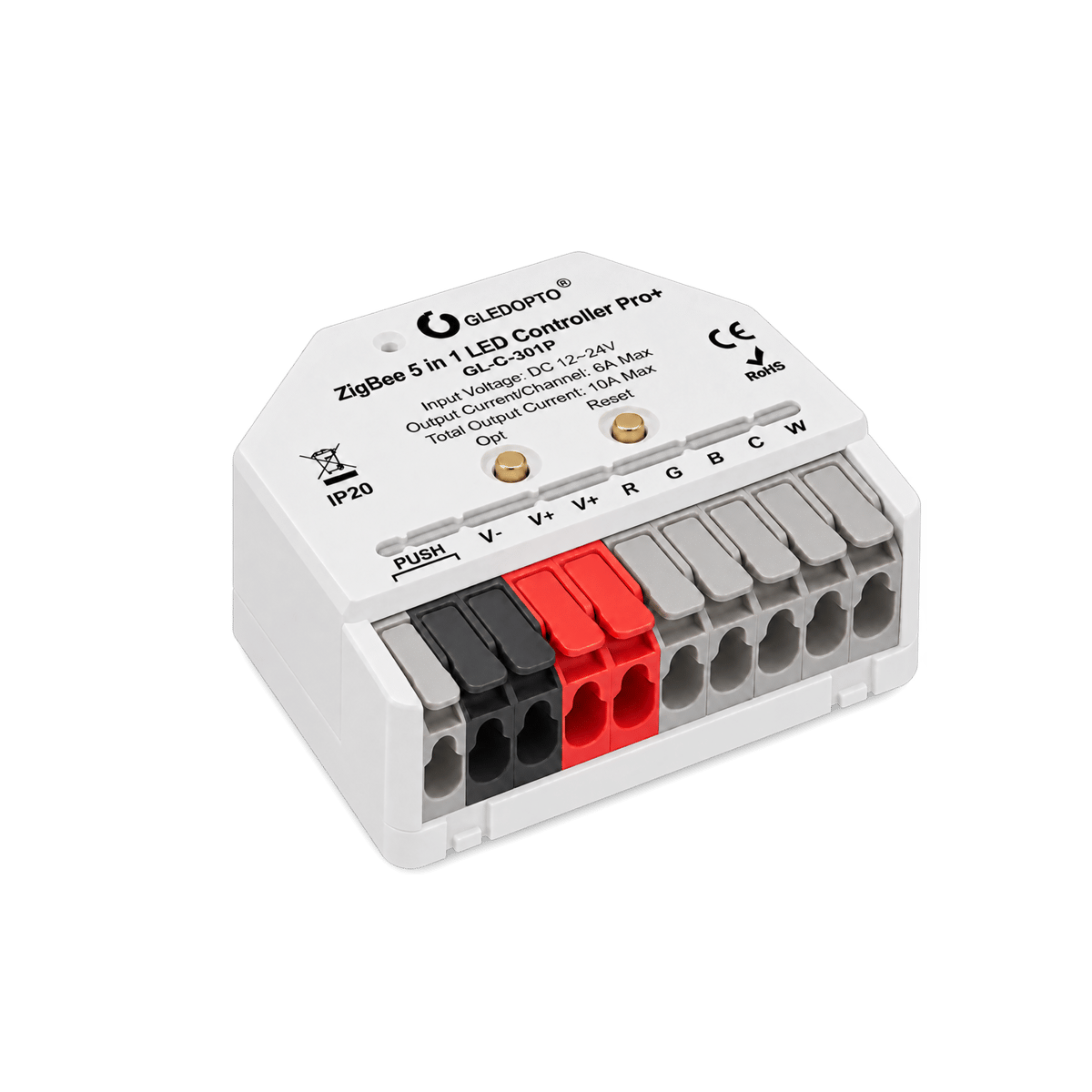
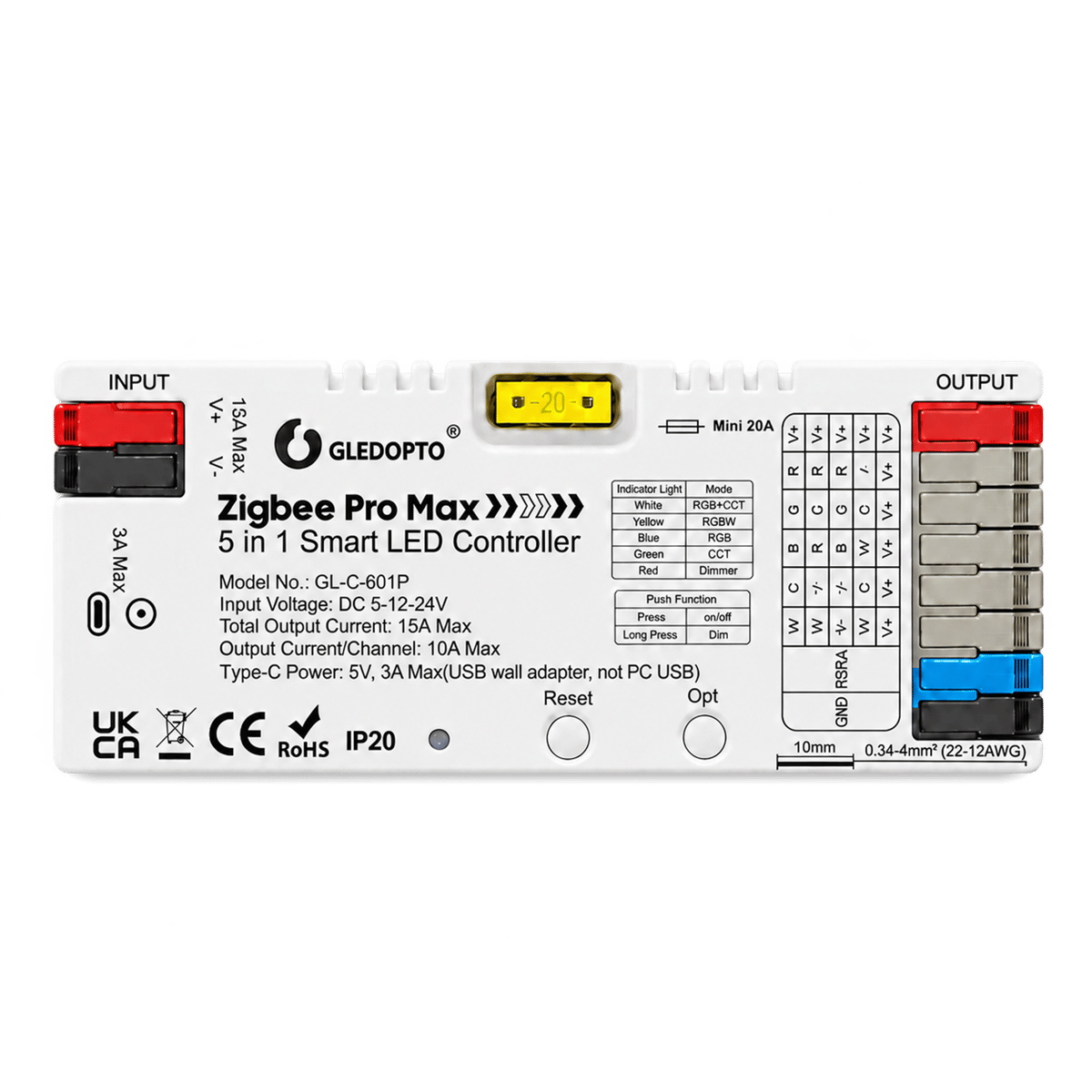
For most Home Assistant setups the Pro+ Mini (GL-C-301P, $35.95) is the better buy: it has confirmed Zigbee2MQTT support, it is 42 mm across so it hides in a channel or ceiling void, and it handles 12 V and 24 V strips up to 10 A. Choose the Pro Max (GL-C-601P, $44.95) when you need 5 V strips, runs up to 15 A, or RGB and white channels driven together. Both are 5-in-1 units, so one controller covers single colour, CCT, RGB, RGBW and RGB+CCT strips. Both run from the strip's DC supply and join the network as Zigbee routers, so each one you add usually strengthens your mesh.

Firmware updates
There is no app-based updater for the Zigbee line: firmware arrives over the air through whatever runs your network. In Zigbee2MQTT, check the OTA tab; an update appears only when Gledopto has published an image for your exact model, and no update showing is normal, not a fault. Hue and SmartThings handle third-party updates quietly in the background when they are available at all. If a controller is working, there is no need to chase a newer firmware.
Frequently asked questions
Do I need the Gledopto app?
Not for these controllers. The Zigbee models are controlled entirely by the platform they are paired to, whether that is Home Assistant, the Hue app or SmartThings. Gledopto's app exists for its Wi-Fi and WLED products, which are a different line.
Will a Gledopto controller extend my Zigbee mesh?
Yes. These controllers are powered devices and join the network as Zigbee routers, which relay traffic for battery devices around them. You can confirm the role in your coordinator's network map.
What LED strips work with a 5-in-1 controller?
Any analog constant-voltage strip within the controller's range: single colour, tunable white (CCT), RGB, RGBW or RGB+CCT. Addressable strips such as WS2812, where each LED is individually controlled, need Gledopto's separate WLED controllers instead.
Why won't my Gledopto controller pair?
Usually the join window has timed out: reopen Permit join or the app's scan, then reset the controller so the two overlap. If it has been paired to another network before, it needs a factory reset first. Pair it where it will actually live rather than next to the coordinator, since a device paired close and moved later can end up on a degraded connection. Zigbee rejoins the network on its own after a power cut, so once it joins it stays joined.
Still need a hand?
We answer most messages within one business day. If your question is about an existing order, have your order number ready. It speeds things up.
Contact us