

















Card guide Home Assistant custom cards
Ultra Card for Home Assistant
Ultra Card is a visual dashboard builder for Home Assistant. Rather than adding one card per thing, you add one Ultra Card and build inside it: 94 modules, drag-and-drop rows and columns, and every setting in the editor instead of in YAML.
What it is
Most custom card packages give you a set of cards. Ultra Card gives you one card and a builder to put inside it. You add a single Ultra Card to the dashboard, then assemble rows, columns and modules within it, which is why a layout that would otherwise take eight stacked cards can end up as one.
The trade is worth understanding before you install it. A dashboard built this way lives inside Ultra Card rather than in Home Assistant's own layout, so you are choosing its editor over the built-in one. In exchange you get modules core Home Assistant has no equivalent for, live styling driven by Jinja2 templates, and the ability to embed native and third-party cards inside the same layout.
Everything below is from the free tier. The 28 PRO modules render a prompt to subscribe rather than the module, so they are not shown here.
Install it through HACS.
What it gives you
Shot on Home Assistant 2026.7.1. Stock is Home Assistant with no theme installed; a theme changes how these look, not what they do.
Theme
Bars
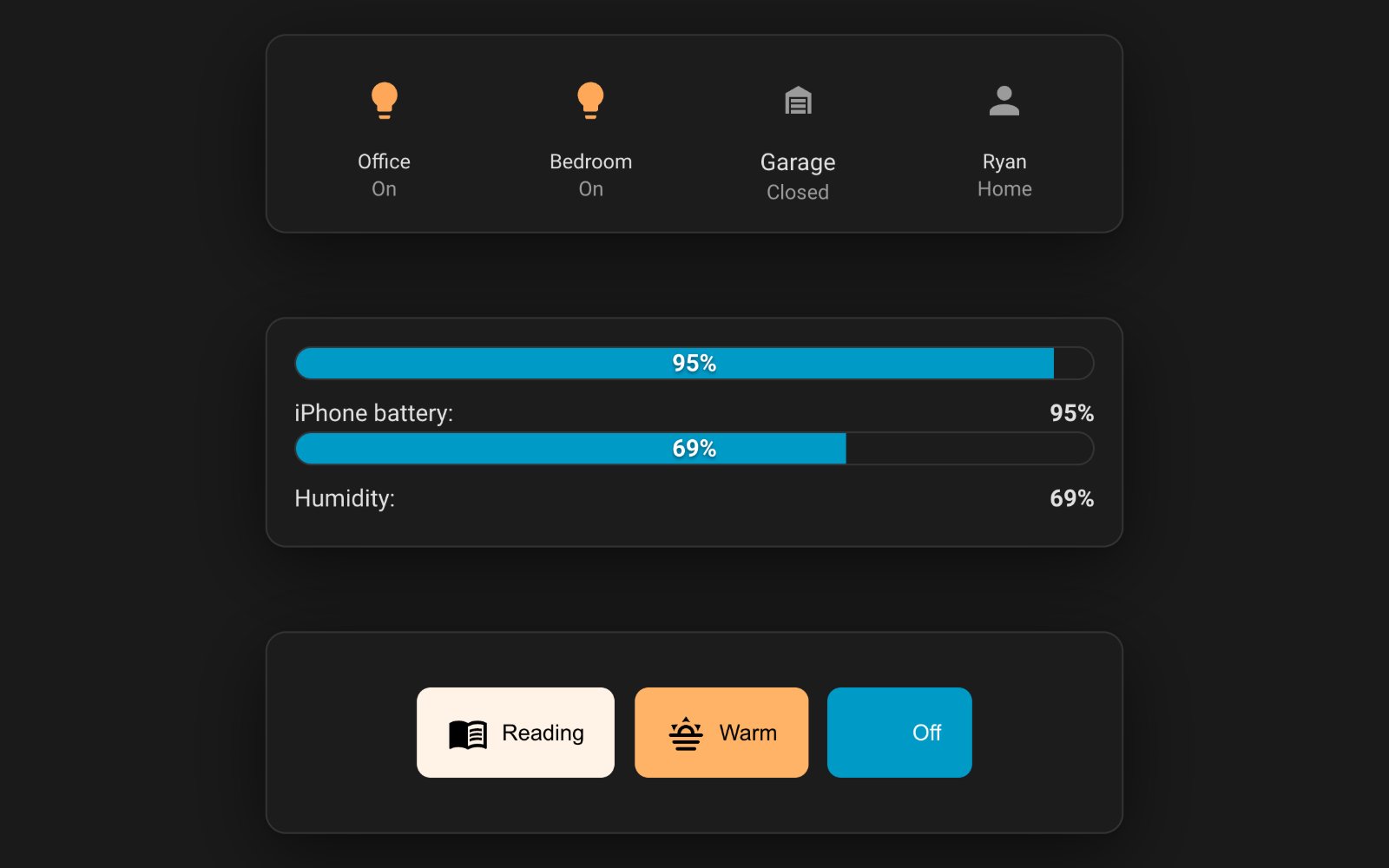
custom:ultra-card Progress bars for any numeric sensor, with an optional label row underneath carrying the name and current value.
Show the YAML
type: custom:ultra-card
_config_version: 3
card_background: var(--card-background-color, var(--ha-card-background, white))
card_border_radius: 12
card_border_color: var(--divider-color)
card_border_width: 1
card_padding: 16
layout:
  rows:
  - id: r1
    columns:
    - id: c1
      modules:
      - id: bar-1
        type: bar
        entity: sensor.ryanrs_iphone_battery_level
        name: iPhone battery
        percentage_type: entity
        bar_size: thick
        bar_radius: pill
        show_percentage: true
        label_alignment: space-between
        left_enabled: true
        left_title: iPhone battery
        right_enabled: true
        right_entity: sensor.ryanrs_iphone_battery_level
      - id: bar-2
        type: bar
        entity: sensor.scoresby_humidity
        name: Humidity
        percentage_type: entity
        bar_size: thick
        bar_radius: pill
        show_percentage: true
        label_alignment: space-between
        left_enabled: true
        left_title: Humidity
        right_enabled: true
        right_entity: sensor.scoresby_humidity
Gauge
custom:ultra-card A sensor value drawn as a gauge, with twelve styles, a gradient or segmented scale, and tick marks.
Show the YAML
type: custom:ultra-card
_config_version: 3
card_background: var(--card-background-color, var(--ha-card-background, white))
card_border_radius: 12
card_border_color: var(--divider-color)
card_border_width: 1
card_padding: 16
layout:
  rows:
  - id: r1
    columns:
    - id: c1
      modules:
      - id: gauge-1
        type: gauge
        entity: sensor.scoresby_humidity
        name: Humidity
        value_type: entity
        min_value: 0
        max_value: 100
        gauge_style: 3d
        gauge_size: 200
        gauge_thickness: 15
        pointer_enabled: true
        pointer_style: needle
        gauge_color_mode: gradient
        use_gradient: true
        gradient_stops:
        - id: s1
          position: 0
          color: '#4CAF50'
        - id: s2
          position: 50
          color: '#FFC107'
        - id: s3
          position: 100
          color: '#F44336'
        show_value: true
        value_position: center
        show_name: true
        name_position: top
        show_min_max: true
        show_ticks: true
        tick_count: 10
Graphs
custom:ultra-card Charts built from Home Assistant history or a weather forecast, in a dozen types from line and area to pie and heatmap.
Show the YAML
type: custom:ultra-card
_config_version: 3
card_background: var(--card-background-color, var(--ha-card-background, white))
card_border_radius: 12
card_border_color: var(--divider-color)
card_border_width: 1
card_padding: 16
layout:
  rows:
  - id: r1
    columns:
    - id: c1
      modules:
      - id: graphs-1
        type: graphs
        name: Outside temperature
        data_source: history
        chart_type: line
        time_period: 24h
        title: Outside temperature
        show_title: true
        chart_height: 260
        chart_width_percent: 100
        smooth_curves: true
        show_grid: true
        show_legend: true
        legend_position: bottom_right
        info_position: top_right
        background_color: transparent
        entities:
        - id: g1
          entity: sensor.scoresby_temp
          name: Scoresby
          color: '#4FC3F7'
          fill_area: true
          line_width: 2
          is_primary: true
Info Items
custom:ultra-card A row of entity values with an icon and a name each, for readouts you want at a glance rather than as a control.
Show the YAML
type: custom:ultra-card
_config_version: 3
card_background: var(--card-background-color, var(--ha-card-background, white))
card_border_radius: 12
card_border_color: var(--divider-color)
card_border_width: 1
card_padding: 16
layout:
  rows:
  - id: r1
    columns:
    - id: c1
      modules:
      - id: info-1
        type: info
        alignment: space-around
        columns: 3
        info_entities:
        - id: i1
          entity: sensor.scoresby_temp
          name: Now
          icon: mdi:thermometer
          show_icon: true
          show_name: true
          show_state: true
          show_units: true
        - id: i2
          entity: sensor.scoresby_max_temp
          name: Max
          icon: mdi:thermometer-chevron-up
          show_icon: true
          show_name: true
          show_state: true
          show_units: true
        - id: i3
          entity: sensor.scoresby_humidity
          name: Humidity
          icon: mdi:water-percent
          show_icon: true
          show_name: true
          show_state: true
          show_units: true
Icons
custom:ultra-card A row of icon buttons that take their colour from entity state and run an action on tap.
Show the YAML
type: custom:ultra-card
_config_version: 3
card_background: var(--card-background-color, var(--ha-card-background, white))
card_border_radius: 12
card_border_color: var(--divider-color)
card_border_width: 1
card_padding: 16
layout:
  rows:
  - id: r1
    columns:
    - id: c1
      modules:
      - id: icon-1
        type: icon
        alignment: space-around
        columns: 4
        icons:
        - id: ic1
          icon_mode: entity
          entity: light.office_back
          name: Office
          icon_inactive: mdi:lightbulb-outline
          icon_active: mdi:lightbulb
          use_state_color_for_active_icon: true
        - id: ic2
          icon_mode: entity
          entity: light.bedroom_downlight_front_right
          name: Bedroom
          icon_inactive: mdi:lightbulb-outline
          icon_active: mdi:lightbulb
          use_state_color_for_active_icon: true
        - id: ic3
          icon_mode: entity
          entity: cover.garage_door_toggle
          name: Garage
          icon_inactive: mdi:garage
          icon_active: mdi:garage-open
          use_state_color_for_active_icon: true
        - id: ic4
          icon_mode: entity
          entity: person.ryan
          name: Ryan
          icon_inactive: mdi:account-off
          icon_active: mdi:account
          use_state_color_for_active_icon: true
Slider Control
custom:ultra-card Drag-to-set sliders for brightness, colour temperature, cover position or any numeric entity, several stacked in one module.
Show the YAML
type: custom:ultra-card
_config_version: 3
card_background: var(--card-background-color, var(--ha-card-background, white))
card_border_radius: 12
card_border_color: var(--divider-color)
card_border_width: 1
card_padding: 16
layout:
  rows:
  - id: r1
    columns:
    - id: c1
      modules:
      - id: slider-1
        type: slider_control
        orientation: horizontal
        layout_mode: overlay
        overlay_position: left
        bars:
        - id: sb1
          type: brightness
          entity: light.office_back
          name: Brightness
          min_value: 0
          max_value: 100
          step: 1
          slider_style: flat
          show_icon: true
          show_name: true
          show_value: true
        - id: sb2
          type: color_temp
          entity: light.office_back
          name: Warmth
          min_value: 0
          max_value: 100
          step: 1
          slider_style: flat
          show_icon: true
          show_name: true
          show_value: true
Light Control
custom:ultra-card Named lighting presets as buttons, each carrying its own brightness, colour and colour temperature, with the button tinted to match.
Show the YAML
type: custom:ultra-card
_config_version: 3
card_background: var(--card-background-color, var(--ha-card-background, white))
card_border_radius: 12
card_border_color: var(--divider-color)
card_border_width: 1
card_padding: 16
layout:
  rows:
  - id: r1
    columns:
    - id: c1
      modules:
      - id: light-1
        type: light
        layout: buttons
        button_alignment: center
        allow_wrapping: true
        button_gap: 0.8
        columns: 3
        show_labels: true
        button_style: filled
        default_transition_time: 0.5
        presets:
        - id: p1
          name: Reading
          action: turn_on
          icon: mdi:book-open-variant
          entities:
          - light.office_back
          brightness: 255
          color_temp: 250
          button_style: filled
          show_label: true
          border_radius: 8
          smart_color: true
          use_light_color_for_button: true
        - id: p2
          name: Warm
          action: turn_on
          icon: mdi:weather-sunset
          entities:
          - light.office_back
          brightness: 140
          color_temp: 400
          button_style: filled
          show_label: true
          border_radius: 8
          smart_color: true
          use_light_color_for_button: true
        - id: p3
          name: "Off"
          action: turn_off
          icon: mdi:lightbulb-off
          entities:
          - light.office_back
          button_style: filled
          show_label: true
          border_radius: 8
Media Player
custom:ultra-card Album art, track details, a seek bar, transport controls and volume, on a background blurred from the artwork.
Show the YAML
type: custom:ultra-card
_config_version: 3
card_background: var(--card-background-color, var(--ha-card-background, white))
card_border_radius: 12
card_border_color: var(--divider-color)
card_border_width: 1
card_padding: 16
layout:
  rows:
  - id: r1
    columns:
    - id: c1
      modules:
      - id: mp-1
        type: media_player
        entity: media_player.unnamed_room
        layout: card
        card_size: 200
        show_name: true
        show_album_art: true
        show_track_info: true
        show_progress: true
        show_duration: true
        show_controls: true
        show_volume: true
        show_album_name: true
        enable_seek: true
        blurred_background: true
        blur_amount: 10
        blur_opacity: 0.4
        album_art_border_radius: 8px
People
custom:ultra-card A person entity as an avatar with a home or away badge, plus data items underneath such as location and phone battery.
Show the YAML
type: custom:ultra-card
_config_version: 3
card_background: var(--card-background-color, var(--ha-card-background, white))
card_border_radius: 12
card_border_color: var(--divider-color)
card_border_width: 1
card_padding: 16
layout:
  rows:
  - id: r1
    columns:
    - id: c1
      modules:
      - id: people-1
        type: people
        person_entity: person.ryan
        layout_style: compact
        show_avatar: true
        show_location_badge: true
        show_battery_badge: true
        battery_entity: sensor.ryanrs_iphone_battery_level
        gap: 12
        data_items_gap: 8
        data_items_direction: column
        alignment: center
        vertical_alignment: center
        data_items:
        - id: d1
          type: location
          show_icon: true
          show_label: true
          show_value: true
          icon: mdi:map-marker
        - id: d2
          type: sensor
          entity: sensor.ryanrs_iphone_battery_level
          label: Battery
          icon: mdi:battery
          show_icon: true
          show_label: true
          show_value: true
        avatar_settings:
          size: 80
          border_width: 3
          border_color: var(--primary-color)
          show_status_badge: true
          status_badge_position: bottom-right
          status_badge_home_color: '#4CAF50'
          status_badge_away_color: '#FF5722'
          use_state_color: true
          state_home_color: '#4CAF50'
          state_away_color: '#FF5722'
          fallback_icon: mdi:account
          show_entity_picture: true
          image_fit: cover
        name_settings:
          show: true
          use_friendly_name: true
          font_size: 18
          font_weight: '600'
          color: var(--primary-text-color)
          alignment: center
        location_settings:
          show: true
          show_icon: true
          icon: mdi:map-marker
          icon_color: var(--secondary-text-color)
          font_size: 14
          color: var(--secondary-text-color)
          show_duration: false
          duration_format: relative
Area Summary
custom:ultra-card Everything Home Assistant knows is in one area, gathered automatically into a room tile with climate readings and quick controls.
Show the YAML
type: custom:ultra-card
_config_version: 3
card_background: var(--card-background-color, var(--ha-card-background, white))
card_border_radius: 12
card_border_color: var(--divider-color)
card_border_width: 1
card_padding: 16
layout:
  rows:
  - id: r1
    columns:
    - id: c1
      modules:
      - id: area-1
        type: area_summary
        area_id: office
        title: Office
        temperature_entity: sensor.hue_motion_sensor_3_temperature
        room_icon: mdi:desk
        tile_border_radius: 20
        style_preset: iconic_soft
        max_quick_actions: 4
        show_quick_entity_names: true
        discovery: {}
        hidden_entities: []
        pinned_entities: []
        room_background_type: none
Tabs
custom:ultra-card Tabbed sections inside one card, each holding its own modules, so several groups share one dashboard slot.
Show the YAML
type: custom:ultra-card
_config_version: 3
card_background: var(--card-background-color, var(--ha-card-background, white))
card_border_radius: 12
card_border_color: var(--divider-color)
card_border_width: 1
card_padding: 16
layout:
  rows:
  - id: r1
    columns:
    - id: c1
      modules:
      - id: tabs-1
        type: tabs
        orientation: horizontal
        style: switch_1
        alignment: left
        default_tab: t1
        font_size: 14px
        font_weight: '500'
        tab_gap: 4
        tab_padding: 10px 16px
        tab_border_radius: 8px
        content_padding: 16px
        sections:
        - id: t1
          title: Weather
          icon: mdi:weather-partly-cloudy
          modules:
          - id: tm1
            type: info
            alignment: space-around
            columns: 3
            info_entities:
            - id: ti1
              entity: sensor.scoresby_temp
              name: Now
              icon: mdi:thermometer
              show_icon: true
              show_name: true
              show_state: true
              show_units: true
            - id: ti2
              entity: sensor.scoresby_humidity
              name: Humidity
              icon: mdi:water-percent
              show_icon: true
              show_name: true
              show_state: true
              show_units: true
            - id: ti3
              entity: sensor.scoresby_min_temp
              name: Min
              icon: mdi:thermometer-chevron-down
              show_icon: true
              show_name: true
              show_state: true
              show_units: true
        - id: t2
          title: Lights
          icon: mdi:lightbulb-group
          modules:
          - id: tm2
            type: icon
            alignment: space-around
            columns: 3
            icons:
            - id: tic1
              icon_mode: entity
              entity: light.office_back
              name: Office
              icon_inactive: mdi:lightbulb-outline
              icon_active: mdi:lightbulb
            - id: tic2
              icon_mode: entity
              entity: light.bedroom_downlight_front_right
              name: Bedroom
              icon_inactive: mdi:lightbulb-outline
              icon_active: mdi:lightbulb
            - id: tic3
              icon_mode: entity
              entity: light.hue_outdoor_spot_1
              name: Outdoor
              icon_inactive: mdi:lightbulb-outline
              icon_active: mdi:lightbulb
The repository
 WJDDesigns/Ultra-Card Ultra Card is a visual dashboard builder for Home Assistant. Rather than adding one card per thing, you add one Ultra Card and build inside it: 94 modules, drag-and-drop rows and columns, and every setting in the editor instead of in YAML.
View on GitHub
WJDDesigns/Ultra-Card Ultra Card is a visual dashboard builder for Home Assistant. Rather than adding one card per thing, you add one Ultra Card and build inside it: 94 modules, drag-and-drop rows and columns, and every setting in the editor instead of in YAML.
View on GitHub
- Author
- WJD Designs @WJDDesigns
- Latest release
- v3.13.3 9 October 2026
- GitHub stars
- 277
- Install via
- HACS Free, MIT
Maintenance: Actively maintained and a HACS default. Version 3.9.0 landed on 1 September 2026, the tracker carries a single open issue, and the licence is MIT. It needs Home Assistant 2024.1 or newer. The catch is commercial rather than technical: 28 of the 94 modules are Ultra Card PRO, as are cloud sync and automatic backups, so a free install gives you 66 modules and local storage.
Built in instead: Sections views with the core Tile and Heading cards cover simple layouts without a builder, and handle most of what a single card needs.
Frequently asked questions
Do I need to pay for Ultra Card?
No. The builder, the visual editor, template mode and 66 of the 94 modules are free. A subscription adds 28 more modules, cloud sync between devices and automatic daily backups.
Do I have to rebuild my dashboard to use it?
No. The 3rd Party Card and Native HA Card modules embed cards you already have inside an Ultra Card layout, so you can adopt it one card at a time.
Does it replace Mushroom or Bubble Card?
Not really. Those give you cards to place; Ultra Card gives you a layout engine to place things in, including cards from those packages.
What is Ultra Card Connect?
A separate integration that adds the Hub sidebar and keeps a PRO sign-in across devices. The card builds dashboards without it.
Still need a hand?
We answer most messages within one business day. If your question is about an existing order, have your order number ready. It speeds things up.
Contact us