

















Card guide Home Assistant custom cards
Room and Notification Cards for Home Assistant
Two button-card templates by polamoros: a room card with a column of round controls and status badges, and a notification card that stacks alerts on top of each other until you hover. You paste them into your dashboard YAML rather than installing them.
What it is
These are two templates for button-card, written by polamoros for their own dashboard and published as a starting point. There is no card to install. You install button-card and card-mod through HACS, then paste the contents of the repository's templates folder into the top of your dashboard's raw configuration, above views:. After that, any button card with template: room_card picks up the look.
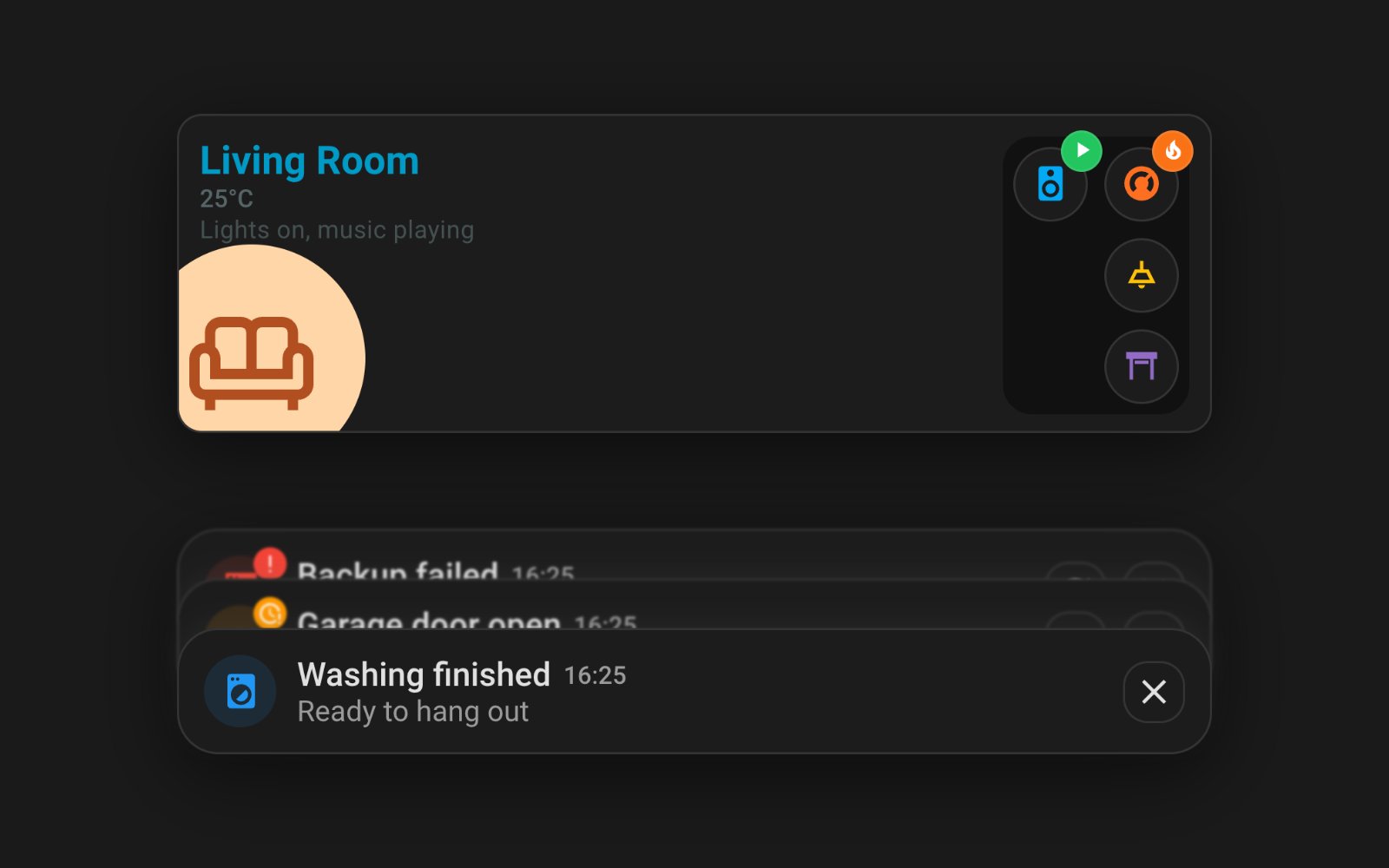
The room card puts the room name, a state line you write yourself and a large icon on a coloured disc in the bottom left corner. The right-hand side is a block of round buttons laid out in columns, so one column of one and one of three gives the layout below. Each button is an ordinary button card, so it can toggle, open more-info or navigate, and each can carry a small badge in green, blue, orange, red or white with an icon or a number.
The notification card is the more unusual one. Each notification is a conditional card that shows while an input_boolean is on, and its close button turns that helper off. Put several in a vertical stack and card-mod overlaps them so only the newest reads in full, with the older ones peeking out above it, slightly blurred. Hover or touch the stack and they spread out. An automation that turns a helper on is how a notification arrives.
The repository also carries the two themes the author runs, minimalist-desktop and minimalist-mobile. They take the borders off the cards and lean on soft shadows instead, which is the Minimalist look below. The mobile one also hides the dashboard header, which you may not want.
What it gives you
Shot on Home Assistant 2026.9.0. Stock is Home Assistant with no theme installed; a theme changes how these look, not what they do.
Theme
Room card
A room's name, temperature and a large icon on the left, with a block of round controls on the right that can each carry a coloured status badge.
Show the YAML
type: custom:button-card
template: room_card
name: Living Room
icon: mdi:sofa-outline
show_state: true
state_display: '[[[ return states[''climate.living''].attributes.current_temperature + ''°C''; ]]]'
variables:
  img_bg: '#ffd6a7'
  icon_color: '#9f2d00'
  sub_state: Lights on, music playing
  actions_columns:
  - - type: custom:button-card
      entity: media_player.living_room_2
      icon: mdi:speaker
      tap_action:
        action: more-info
      variables:
        badge_type: success
        badge_icon: mdi:play
  - - type: custom:button-card
      entity: climate.living
      icon: mdi:thermostat
      tap_action:
        action: more-info
      variables:
        badge_type: warning
        badge_icon: mdi:fire
    - type: custom:button-card
      entity: light.living_lights
      icon: mdi:ceiling-light-outline
      tap_action:
        action: toggle
    - type: custom:button-card
      entity: cover.living_room_window
      icon: mdi:window-shutter-open
      tap_action:
        action: more-info
grid_options:
  columns: 12
Stacked notification card
Alerts driven by input_boolean helpers that pile up behind one another and fan out when you hover or touch, each with its own action buttons and a close button.
Show the YAML
type: custom:mod-card
card:
  type: vertical-stack
  cards:
  - type: conditional
    conditions:
    - condition: state
      entity: input_boolean.notify_backup_failed
      state: 'on'
    card:
      type: custom:button-card
      template: notification_card
      entity: input_boolean.notify_backup_failed
      variables:
        icon: mdi:server
        icon_bg: rgba(244, 67, 54, 0.12)
        icon_color: '#f44336'
        badge_bg: '#f44336'
        badge_icon: mdi:exclamation
        title: Backup failed
        message: The nightly backup could not reach the NAS
        actions_list:
        - type: custom:button-card
          icon: mdi:refresh
          show_name: false
          tap_action:
            action: perform-action
            perform_action: button.press
            target:
              entity_id: button.backup_now
  - type: conditional
    conditions:
    - condition: state
      entity: input_boolean.notify_garage_open
      state: 'on'
    card:
      type: custom:button-card
      template: notification_card
      entity: input_boolean.notify_garage_open
      variables:
        icon: mdi:garage-open
        icon_bg: rgba(255, 152, 0, 0.12)
        icon_color: '#ff9800'
        badge_bg: '#ff9800'
        badge_icon: mdi:clock-alert-outline
        title: Garage door open
        message: Open for 20 minutes
        actions_list:
        - type: custom:button-card
          icon: mdi:garage
          show_name: false
          tap_action:
            action: perform-action
            perform_action: cover.close_cover
            target:
              entity_id: cover.garage_door
  - type: conditional
    conditions:
    - condition: state
      entity: input_boolean.notify_washer_done
      state: 'on'
    card:
      type: custom:button-card
      template: notification_card
      entity: input_boolean.notify_washer_done
      variables:
        icon: mdi:washing-machine
        icon_bg: rgba(33, 150, 243, 0.12)
        icon_color: '#2196f3'
        title: Washing finished
        message: Ready to hang out
grid_options:
  columns: 12
  rows: auto
card_mod:
  style:
    hui-vertical-stack-card$: "hui-card {\n  position: relative;\n  border-radius: 20px;\n  transition: all 0.3s ease;\n}\n/* Stacked (only when next card is visible) */\nhui-card:not([hidden]) ~ hui-card:not([hidden])\
      \ {\n  margin-top: -45px;\n  box-shadow: 0 -5px 10px rgba(100,100,100,0.1);\n}\n/* Blur all but the last visible */\nhui-card:has(~ hui-card:not([hidden])) {\n  filter: blur(0.6px);\n}\n/* The last/top\
      \ visible card stays clear */\nhui-card:not(:has(~ hui-card:not([hidden]))) {\n  filter: none;\n  background: var(--card-background-color);\n}\n/* On hover/active → unstack and clear ALL */\n:host(:hover)\
      \ hui-card,\n:host(:active) hui-card {\n  margin-top: 0 !important;\n  box-shadow: none !important;\n  filter: none !important;\n}\n"
The repository
 polamoros/home-assistant-cards Two button-card templates by polamoros: a room card with a column of round controls and status badges, and a notification card that stacks alerts on top of each other until you hover. You paste them into your dashboard YAML rather than installing them.
View on GitHub
polamoros/home-assistant-cards Two button-card templates by polamoros: a room card with a column of round controls and status badges, and a notification card that stacks alerts on top of each other until you hover. You paste them into your dashboard YAML rather than installing them.
View on GitHub
- Author
- polamoros @polamoros
- Latest release
- GitHub stars
- 293
- Install via
- HACS Free
Maintenance: One developer's personal templates, last updated in January 2026, with no releases and no licence file, so the YAML is all rights reserved by default. They depend on button-card and card-mod, and the repository's own notification example uses variable names the template ignores, so work from the template rather than the example.
Built in instead: The core Area card gives a room overview with a few controls and needs nothing installed. Nothing in core Home Assistant stacks notifications.
Frequently asked questions
Why does the example notification come out blank?
The example in the repository passes card_name and a top-level label, but the template reads title, message and icon from variables, and reads the timestamp from the card's own entity. Set entity on the button card and use those three variable names.
Do I need the themes?
No. The Stock and Stock light shots above are the templates with no theme at all.
How does a notification arrive and go away?
An automation turns its input_boolean on, and the card appears. The close button turns the helper off again. Give each kind of notification its own helper.
Still need a hand?
We answer most messages within one business day. If your question is about an existing order, have your order number ready. It speeds things up.
Contact us