

















Card guide Home Assistant custom cards
Mushroom cards for Home Assistant
A coordinated family of compact cards with visual editors. People reach for it for the look, plus its chips and templating.
What it gives you
Shot on Home Assistant 2026.7.1. Stock is Home Assistant with no theme installed; a theme changes how these look, not what they do.
Theme
Title card
custom:mushroom-title-card A heading and subheading with no card behind them, for splitting a long view into named groups.
Show the YAML
type: custom:mushroom-title-card
title: Living area
subtitle: Lights, blinds and the aircon
Chips card
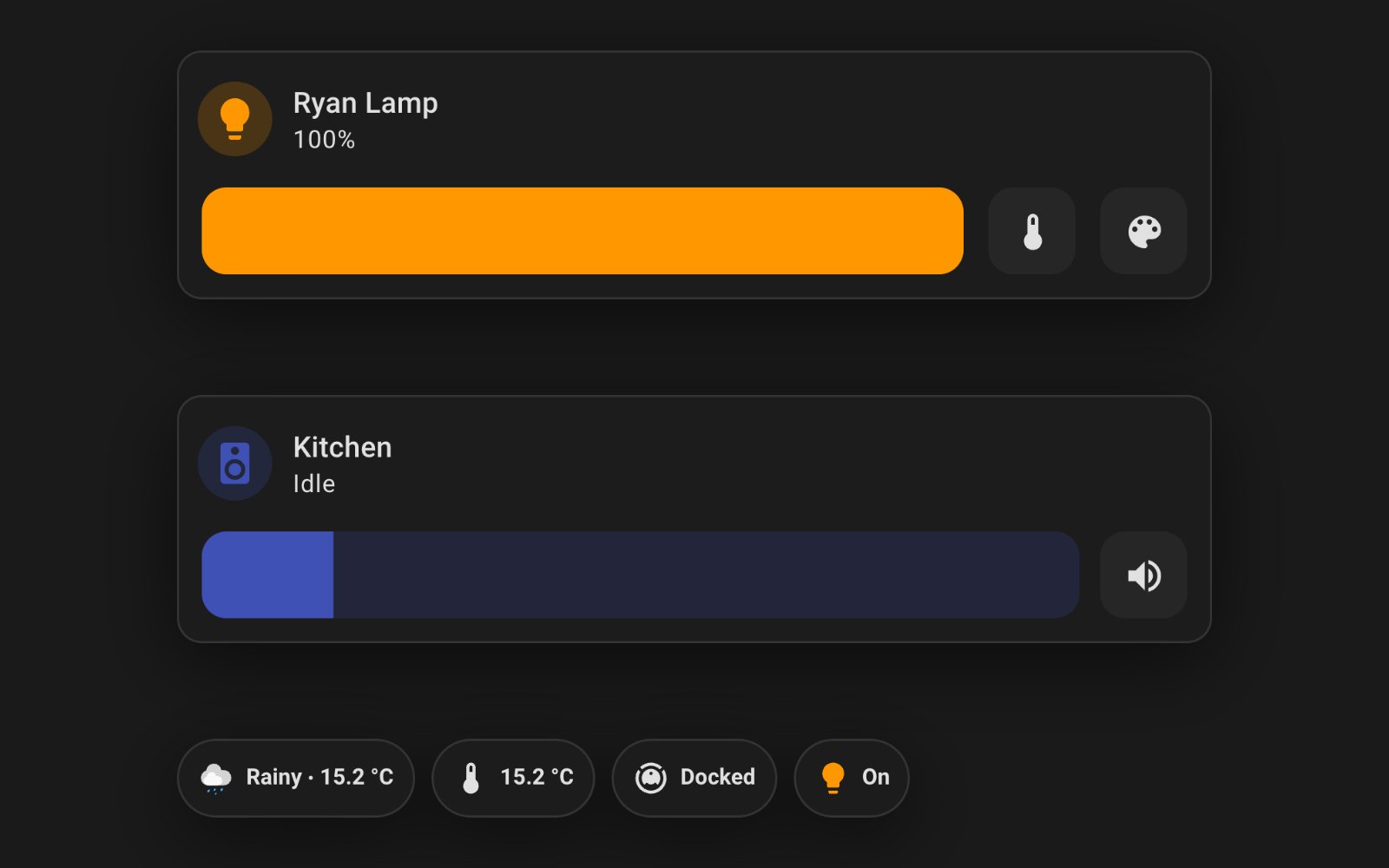
custom:mushroom-chips-card A row of small pills for at-a-glance state: weather, a temperature, whether the vacuum is docked, how many lights are on.
Show the YAML
type: custom:mushroom-chips-card
chips:
  - type: weather
    entity: weather.heathmont
    show_conditions: true
    show_temperature: true
  - type: entity
    entity: sensor.scoresby_temp
    icon: mdi:thermometer
  - type: entity
    entity: vacuum.robot_vacuum
  - type: light
    entity: light.hue_color_lamp_1_3
Light card
custom:mushroom-light-card One light with brightness, colour and colour-temperature sliders on the card itself, instead of behind a dialog.
Show the YAML
type: custom:mushroom-light-card
entity: light.hue_color_lamp_1_3
name: Ryan Lamp
show_brightness_control: true
show_color_control: true
show_color_temp_control: true
collapsible_controls: false
Climate card
custom:mushroom-climate-card A thermostat with the target temperature and the modes you actually use, rather than every mode the entity advertises.
Show the YAML
type: custom:mushroom-climate-card
entity: climate.living
name: Living
show_temperature_control: true
hvac_modes:
  - "off"
  - cool
  - heat
Cover card
custom:mushroom-cover-card A blind or curtain with open, stop and close buttons plus a position slider.
Show the YAML
type: custom:mushroom-cover-card
entity: cover.living_roller_right
name: Living Right
show_position_control: true
show_buttons_control: true
Media player card
custom:mushroom-media-player-card A speaker or TV with what is playing, a volume slider and the transport buttons you choose to show.
Show the YAML
type: custom:mushroom-media-player-card
entity: media_player.kitchen
name: Kitchen
use_media_info: true
volume_controls:
  - volume_mute
  - volume_set
Vacuum card
custom:mushroom-vacuum-card A robot vacuum with its state and only the commands worth a button: start, stop, back to the dock.
Show the YAML
type: custom:mushroom-vacuum-card
entity: vacuum.robot_vacuum
name: Robot Vacuum
commands:
  - start_pause
  - stop
  - return_home
Person card
custom:mushroom-person-card Who is home, with the person's picture and their zone.
Show the YAML
type: custom:mushroom-person-card
entity: person.ryan
Entity card
custom:mushroom-entity-card The generic one: any entity, its icon and its state, in the same shape as the rest of the family.
Show the YAML
type: custom:mushroom-entity-card
entity: sensor.scoresby_temp
name: Outside
icon: mdi:thermometer
Alarm card
custom:mushroom-alarm-control-panel-card An alarm panel showing only the arm modes you list, so nobody arms the wrong one by accident.
Show the YAML
type: custom:mushroom-alarm-control-panel-card
entity: alarm_control_panel.garage_dream_machine_pro_alarm_manager
name: Alarm
states:
  - armed_away
  - armed_home
Template card
custom:mushroom-template-card A card you write yourself: the text, icon and colour all come from templates, so it can say anything Home Assistant knows.
Show the YAML
type: custom:mushroom-template-card
primary: Good evening, Ryan
secondary: "{{ states('sensor.scoresby_temp') }} degrees outside"
icon: mdi:home
icon_color: amber
The repository
 piitaya/lovelace-mushroom A coordinated family of compact cards with visual editors. People reach for it for the look, plus its chips and templating.
View on GitHub
piitaya/lovelace-mushroom A coordinated family of compact cards with visual editors. People reach for it for the look, plus its chips and templating.
View on GitHub
- Author
- Paul Bottein @piitaya
- Latest release
- v5.2.3 1 September 2026
- GitHub stars
- 5.2k
- Install via
- HACS Free, Apache-2.0
Maintenance: Actively maintained: v5.2.2 landed in July 2026 with commits since, and it needs Home Assistant 2025.10 or newer.
Built in instead: Tile now covers most single-entity control. The chips row and the template card are what core still has no answer for.
Still need a hand?
We answer most messages within one business day. If your question is about an existing order, have your order number ready. It speeds things up.
Contact us