

















Card guide Home Assistant custom cards
Compact Power Card for Home Assistant
A single card that draws the whole flow of power through a solar house: panels, grid, batteries, the home, and the individual loads underneath. It fits that picture into a card you size yourself, rather than a page of its own.
What it is
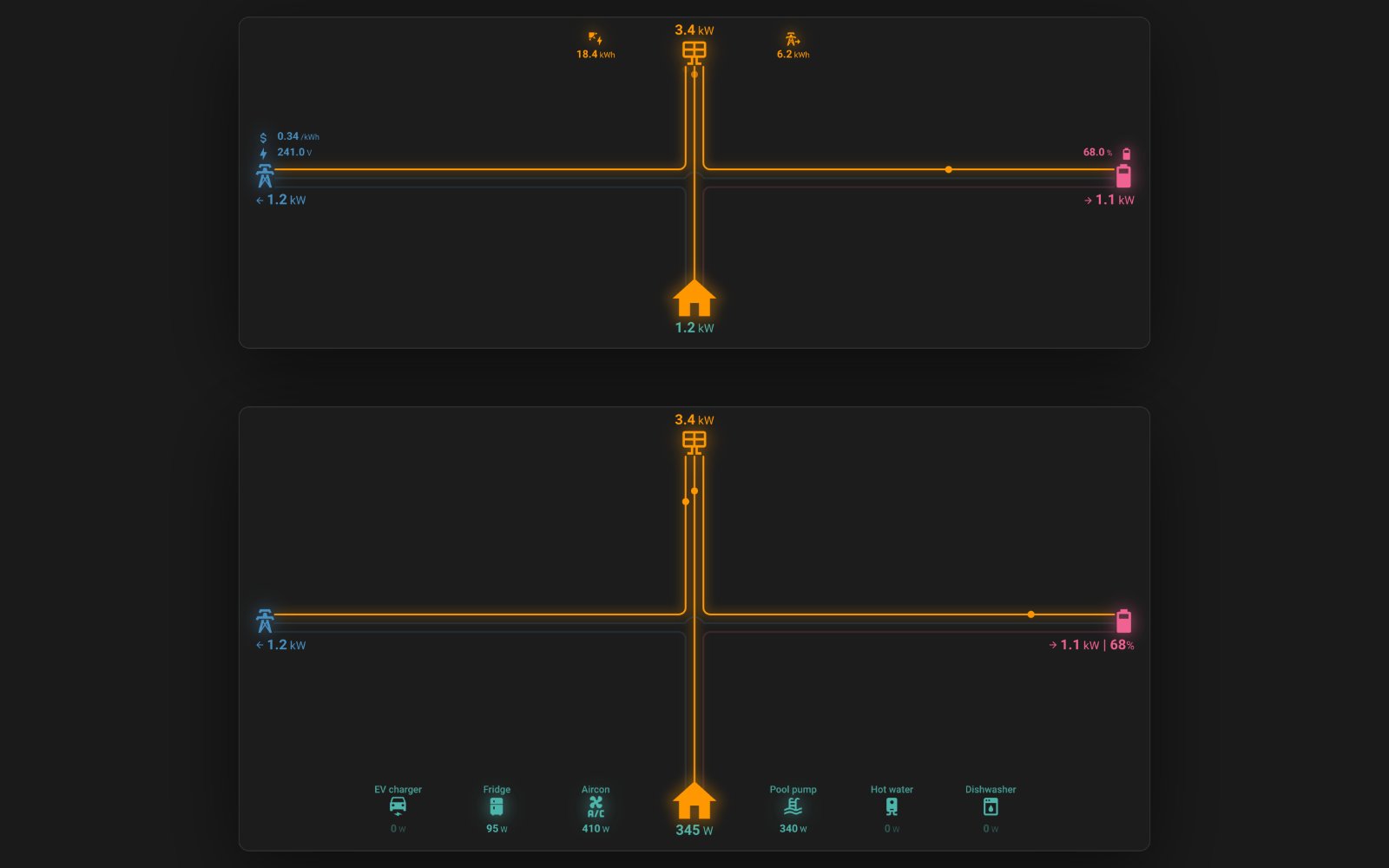
Compact Power Card draws one picture: where your electricity is coming from and where it is going. Panels at the top, the grid on the left, batteries on the right, the house at the bottom, and a line between each of them that lights up in the direction power is actually flowing.
It is one card rather than a set. Everything below is the same custom:compact-power-card with a different entities: block underneath it, which is why the configurations matter more here than a feature list would. The card draws whatever you give it and leaves out what you don't: no battery sensor, no battery branch.
The reason to reach for it over the Energy dashboard's distribution card is space and detail. It sits in a sections view at whatever size you give it, it will carry a row of individual loads along the bottom, and it will hang arbitrary labels off each source, so grid voltage, today's generation and your current tariff can share a card with the flow itself.
Two things catch people out. The card reads a positive grid value as export and a negative battery value as charge, which is the opposite of several common integrations, so if the arrows point the wrong way reach for invert_state_values before you doubt the sensor. And it hides what it cannot fit: devices and labels beyond the card's current size are dropped without a warning, so a device you added and cannot see usually means the card needs more columns or rows, not a different entity.
It installs through HACS.
What it gives you
Shot on Home Assistant 2026.8.3. Stock is Home Assistant with no theme installed; a theme changes how these look, not what they do.
Theme
Solar, grid, battery and home
custom:compact-power-card The full picture, with the home figure worked out from the other three so you don't need a whole-home sensor.
Show the YAML
type: custom:compact-power-card
curve_factor: 1
entities:
  pv:
    entity: sensor.solar_power
  grid:
    entity: sensor.grid_power
  battery:
    - entity: sensor.battery_power
      battery_soc: sensor.battery_soc
      show_soc: true
grid_options:
  columns: 24
  rows: 6
Without a battery
custom:compact-power-card Leave the battery out and the card drops that branch, which is the shape most Australian rooftop installs need.
Show the YAML
type: custom:compact-power-card
curve_factor: 1
entities:
  pv:
    entity: sensor.solar_power
  grid:
    entity: sensor.grid_power
  home:
    entity: sensor.home_power
grid_options:
  columns: 24
  rows: 6
Grid and home only
custom:compact-power-card No panels, no battery: just what the house is pulling from the grid, drawn as two icons rather than empty branches.
Show the YAML
type: custom:compact-power-card
curve_factor: 1
entities:
  grid:
    entity: sensor.grid_import_power
  home:
    entity: sensor.home_power
grid_options:
  columns: 24
  rows: 4
Device row
custom:compact-power-card A row of individual loads along the bottom, each with its own icon and reading, optionally subtracted from the home figure.
Show the YAML
type: custom:compact-power-card
curve_factor: 1
subtract_devices_from_home: true
show_device_power_lines: true
entities:
  pv:
    entity: sensor.solar_power
  grid:
    entity: sensor.grid_power
  home:
    entity: sensor.home_power
  battery:
    - entity: sensor.battery_power
      battery_soc: sensor.battery_soc
      show_soc: true
  devices:
    - entity: sensor.aircon_power
      icon: mdi:air-conditioner
      name: Aircon
    - entity: sensor.pool_pump_power
      icon: mdi:pool
      name: Pool pump
    - entity: sensor.fridge_power
      icon: mdi:fridge
      name: Fridge
    - entity: sensor.hot_water_power
      icon: mdi:water-boiler
      name: Hot water
    - entity: sensor.ev_charger_power
      icon: mdi:car-electric
      name: EV charger
    - entity: sensor.dishwasher_power
      icon: mdi:dishwasher
      name: Dishwasher
grid_options:
  columns: 24
  rows: 8
Labels
custom:compact-power-card Extra readings hung off each source: grid voltage and tariff, generation so far today, state of charge. Display only, never part of the calculation.
Show the YAML
type: custom:compact-power-card
curve_factor: 1
entities:
  pv:
    entity: sensor.solar_power
    labels:
      - entity: sensor.solar_energy_today
        icon: mdi:solar-power
      - entity: sensor.solar_export_today
        icon: mdi:transmission-tower-export
  grid:
    entity: sensor.grid_power
    labels:
      - entity: sensor.grid_voltage
        icon: mdi:lightning-bolt
        unit: V
      - entity: sensor.ovo_energy_au_tariff_rates_peak_rate
        icon: mdi:currency-usd
        unit: /kWh
        decimal_places: 2
  battery:
    - entity: sensor.battery_power
      battery_soc: sensor.battery_soc
  battery_labels:
    - entity: sensor.battery_soc
      icon: mdi:battery-70
grid_options:
  columns: 24
  rows: 6
Two batteries
custom:compact-power-card More than one battery, with a combined state of charge weighted by each pack's capacity and the individual packs listed underneath.
Show the YAML
type: custom:compact-power-card
curve_factor: 1
entities:
  pv:
    entity: sensor.solar_power
  grid:
    entity: sensor.grid_power
  battery:
    - entity: sensor.battery_power
      battery_soc: sensor.battery_soc
      battery_capacity: 13.5
      show_soc: true
    - entity: sensor.battery_2_power
      battery_soc: sensor.battery_2_soc
      battery_capacity: 9.5
      show_soc: true
grid_options:
  columns: 24
  rows: 6
The repository
 pacemaker82/Compact-Power-Card A single card that draws the whole flow of power through a solar house: panels, grid, batteries, the home, and the individual loads underneath. It fits that picture into a card you size yourself, rather than a page of its own.
View on GitHub
pacemaker82/Compact-Power-Card A single card that draws the whole flow of power through a solar house: panels, grid, batteries, the home, and the individual loads underneath. It fits that picture into a card you size yourself, rather than a page of its own.
View on GitHub
- Author
- pacemaker82 @pacemaker82
- Latest release
- v1.3.4.1 14 May 2026
- GitHub stars
- 161
- Install via
- HACS Free
Maintenance: Actively maintained by one developer who tends to answer within a day, and a lit compatibility break under Home Assistant 2026.4 was reported and fixed the same afternoon. Worth knowing that the repository carries no licence file, so the code is all rights reserved by default, and that most of the open issues are feature requests rather than faults.
Built in instead: Home Assistant's own Energy dashboard already draws solar, grid and battery flow, and needs nothing installed.
Frequently asked questions
Do I need solar panels to use it?
No. The card draws whichever of the four sources you configure. Grid and home alone gives a two-icon card showing what the house is pulling, which is all a home without panels has to show.
Why is my devices row empty?
The devices key goes inside the entities: block, not at the top level of the card. The README's example is indented in a way that suggests otherwise, and a misplaced devices key renders a card with no error and no devices.
Can it show more than one battery?
Yes. The battery key is a list. Give each entry its own state-of-charge sensor and capacity, and the card shows a combined figure weighted by capacity with the individual packs listed underneath.
Why do my arrows point the wrong way?
It expects a positive grid value to mean export and a negative battery value to mean charge. Where an integration uses the opposite sign, set invert_state_values: true on that entity, or give the card separate import/export and charge/discharge sensors instead.
Still need a hand?
We answer most messages within one business day. If your question is about an existing order, have your order number ready. It speeds things up.
Contact us