

















Card guide Home Assistant custom cards
card-mod for Home Assistant
Lets you add your own CSS to almost any Home Assistant card, for the changes a card's options and your theme can't make. It adds one card of its own, mod-card. Everything else is styling on cards you already have.
What it is
card-mod lets you write CSS into a Home Assistant card's configuration. Add a card_mod block with a style to any card and the card picks it up. It works on nearly every built-in card and on most custom ones.
It adds one card of its own, mod-card. Every other example on this page is a stock card with card-mod applied, shown under the same card without it.
Install it through HACS. The README also recommends loading it as a frontend module, through extra_module_url in configuration.yaml, which makes it faster and is needed to style anything outside a dashboard, such as the sidebar.
card-mod works by reaching into how the Home Assistant frontend is built, not through a supported styling interface. When the frontend changes, card-mod can stop working, and its README keeps a table of which card-mod version each Home Assistant release needs. Use it for the few things nothing else can do, and keep the styles short so they are easy to take out.
Themes can carry card-mod styles too, applied to every card at once. That setup accounts for most of the breakage reported on 2026.9, so it is left out here.
What it gives you
Shot on Home Assistant 2026.9.0. Stock is Home Assistant with no theme installed; a theme changes how these look, not what they do.
Theme
Colour swatches
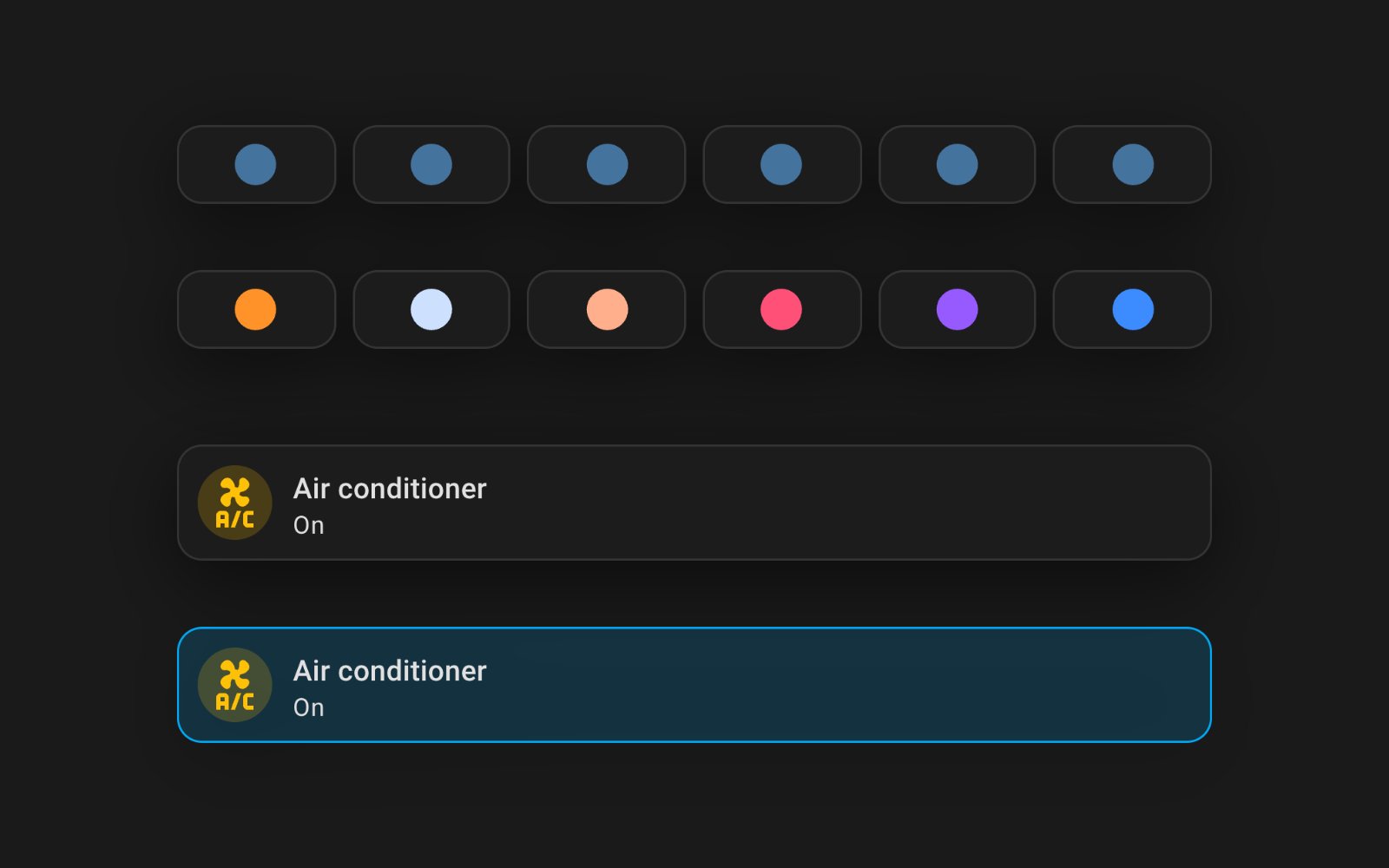
Six Button cards that each set a light's colour. With the light off, stock Home Assistant draws every icon the same colour, so the row tells you nothing. card-mod gives each icon its own colour. Stock above, card-mod below.
Show the YAML
type: horizontal-stack
cards:
- type: button
  name: Warm
  show_name: false
  show_state: false
  icon: mdi:circle
  icon_height: 30px
  tap_action:
    action: perform-action
    perform_action: light.turn_on
    target:
      entity_id: light.living_lights
    data:
      color_temp_kelvin: 2200
  card_mod:
    style: "ha-card {\n  --paper-item-icon-color: rgb(255,147,41) !important;\n}\nha-card ha-icon, ha-card ha-state-icon {\n  color: rgb(255,147,41) !important;\n}\n"
- type: button
  name: Cool
  show_name: false
  show_state: false
  icon: mdi:circle
  icon_height: 30px
  tap_action:
    action: perform-action
    perform_action: light.turn_on
    target:
      entity_id: light.living_lights
    data:
      color_temp_kelvin: 5000
  card_mod:
    style: "ha-card {\n  --paper-item-icon-color: rgb(205,225,255) !important;\n}\nha-card ha-icon, ha-card ha-state-icon {\n  color: rgb(205,225,255) !important;\n}\n"
- type: button
  name: Peach
  show_name: false
  show_state: false
  icon: mdi:circle
  icon_height: 30px
  tap_action:
    action: perform-action
    perform_action: light.turn_on
    target:
      entity_id: light.living_lights
    data:
      rgb_color:
      - 255
      - 175
      - 140
  card_mod:
    style: "ha-card {\n  --paper-item-icon-color: rgb(255,175,140) !important;\n}\nha-card ha-icon, ha-card ha-state-icon {\n  color: rgb(255,175,140) !important;\n}\n"
- type: button
  name: Rose
  show_name: false
  show_state: false
  icon: mdi:circle
  icon_height: 30px
  tap_action:
    action: perform-action
    perform_action: light.turn_on
    target:
      entity_id: light.living_lights
    data:
      rgb_color:
      - 255
      - 80
      - 120
  card_mod:
    style: "ha-card {\n  --paper-item-icon-color: rgb(255,80,120) !important;\n}\nha-card ha-icon, ha-card ha-state-icon {\n  color: rgb(255,80,120) !important;\n}\n"
- type: button
  name: Violet
  show_name: false
  show_state: false
  icon: mdi:circle
  icon_height: 30px
  tap_action:
    action: perform-action
    perform_action: light.turn_on
    target:
      entity_id: light.living_lights
    data:
      rgb_color:
      - 150
      - 90
      - 255
  card_mod:
    style: "ha-card {\n  --paper-item-icon-color: rgb(150,90,255) !important;\n}\nha-card ha-icon, ha-card ha-state-icon {\n  color: rgb(150,90,255) !important;\n}\n"
- type: button
  name: Ocean
  show_name: false
  show_state: false
  icon: mdi:circle
  icon_height: 30px
  tap_action:
    action: perform-action
    perform_action: light.turn_on
    target:
      entity_id: light.living_lights
    data:
      rgb_color:
      - 60
      - 140
      - 255
  card_mod:
    style: "ha-card {\n  --paper-item-icon-color: rgb(60,140,255) !important;\n}\nha-card ha-icon, ha-card ha-state-icon {\n  color: rgb(60,140,255) !important;\n}\n"
Background and corners
An Entities card given a gradient background, larger corners and white text. Stock above, card-mod below.
Show the YAML
type: entities
title: Guest Wi-Fi
entities:
- switch.arcadia_guest
card_mod:
  style: "ha-card {\n  background: #2b5876 linear-gradient(135deg, #2b5876, #4e4376);\n  border-radius: 28px;\n  --primary-text-color: #fff;\n  --secondary-text-color: #e0e0e0;\n  color: #fff;\n}\n"
Styles that follow state
card-mod styles accept templates, so a card can change with an entity. This Tile card turns blue and gets a border only while the air conditioner is on. Stock above, card-mod below.
Show the YAML
type: tile
entity: switch.ac
name: Air conditioner
card_mod:
  style: "ha-card {\n  {% if is_state('switch.ac', 'on') %}\n  background: rgba(3, 169, 244, 0.18);\n  border: 1px solid rgb(3, 169, 244);\n  {% endif %}\n}\n"
mod-card
custom:mod-card A stack has no card of its own, so there is nothing for card_mod to style. mod-card wraps any card and gives it one, here a border around two Button cards. Plain stack above, mod-card below.
Show the YAML
type: custom:mod-card
card_mod:
  style: "ha-card {\n  border: 2px solid rgb(255, 147, 41);\n  border-radius: 16px;\n  padding: 8px;\n}\n"
card:
  type: horizontal-stack
  cards:
  - type: button
    entity: light.main_bedroom
  - type: button
    entity: light.office_lights
  grid_options:
    columns: 12
    rows: auto
The repository
 thomasloven/lovelace-card-mod Lets you add your own CSS to almost any Home Assistant card, for the changes a card's options and your theme can't make. It adds one card of its own, mod-card. Everything else is styling on cards you already have.
View on GitHub
thomasloven/lovelace-card-mod Lets you add your own CSS to almost any Home Assistant card, for the changes a card's options and your theme can't make. It adds one card of its own, mod-card. Everything else is styling on cards you already have.
View on GitHub
- Author
- Thomas Lovén @thomasloven
- Latest release
- v4.2.1 8 February 2026
- GitHub stars
- 1.8k
- Install via
- HACS Free, MIT
Maintenance: Maintained, but releases come slowly, and a new Home Assistant release is usually what breaks it. Since 2026.9 there are open reports of styles not applying, a dashboard refresh loop and a slow edit mode, though every example here rendered on 2026.9.0. Check the compatibility table in its README before you update Home Assistant.
Built in instead: A theme changes colours, fonts and corners across the whole dashboard, and the Tile card takes a colour of its own. Neither can style one card by itself or colour an icon while its entity is off.
Frequently asked questions
Does card-mod add any cards?
One, mod-card. Everything else it does is styling added to cards you already have, through a card_mod block in each card's YAML.
Can I add card-mod styles in the visual editor?
Only in the code editor. Open the card, switch to the code editor and add the card_mod block. The visual editor then shows a small brush icon to say the card has styles it cannot display.
Still need a hand?
We answer most messages within one business day. If your question is about an existing order, have your order number ready. It speeds things up.
Contact us